
FiveM Texture Loss Fix: Player and Server Fixes
Fix it from both sides: the settings players can change, and the oversized streamed textures that server owners can find and shrink.
Blurry textures, textures not loading at all, invisible roads, buildings that never finish loading: FiveM players call this texture loss, or the city bug. There is no single FiveM texture loss fix, because the problem has two sides.
If it follows you onto every server, start with your own graphics settings. If it happens on one server, or many players see it in the same places, that server is probably streaming textures that are too big. The server console names those files, and shrinking them removes that cause.
What causes texture loss in FiveM
GTA V doesn't keep the whole map in memory. It streams textures and models in and out as you move, within a memory budget. When the things around you need more memory than that budget allows, some of them stay at low detail or don't load at all. Texture loss is a streaming problem.
Three things decide how close you get to that limit:
- Player settings. Texture quality, the texture budget and distance scaling change how much the game tries to load and how much memory it has to work with.
- The PC. The graphics card's video memory decides how far you can raise the texture budget. FiveM also gives the game more memory for streaming on PCs with at least 12 GB of RAM, and more again from 16 GB.
- Server assets. Custom cars, clothing, maps and props stream into the same memory. A server whose textures are far bigger than they need to be fills it faster, for every player.
FiveM texture loss fixes for players
These are the fixes players are usually given. None of them is guaranteed, and the right values depend on your graphics card.
- Raise Extended Texture Budget. In the pause menu, open Settings > Graphics and raise Extended Texture Budget. It lets the game use more video memory for textures, so go up one step at a time and go back a step if the game starts to stutter.
- Lower Texture Quality. In the same menu, drop Texture Quality from Very High to High. Very High also loads the extra high-detail
+hitexture files that many cars ship with, and High skips them. Normal goes further and loads textures at half resolution. - Turn down Extended Distance Scaling. Under Settings > Advanced Graphics, lower Extended Distance Scaling. It loads more detail far away, and that detail needs memory too.
- Close FiveM between servers. Many server guides ask players to quit the game completely before they join a different server.
- Clear FiveM's cache if textures broke right after a server update or a failed download. Your game then downloads the server's files again. It won't help when the cause is memory.
If the problem only shows up on one server, the cause is probably its assets, not your PC. Send the server's staff a screenshot and the place where it happens. The rest of this guide is for them.
When the server causes texture loss
No graphics setting fixes a texture that is simply too big. These signs point to the server:
- Many players report it, not just one.
- It happens in the same places, such as around a custom building or a garage full of add-on cars.
- It started after you added or updated a resource.
- The server console shows oversized asset warnings.
Oversized textures are common in downloaded packs. Across 43 texture dictionaries from community packs, mostly vehicles, 15 declared more than 16 MiB, the point where the server starts to warn. Four were past 48 MiB, and the biggest, a 13.8 MB file, declared 166 MiB.
Find oversized assets in the server console
FXServer checks the streamed files in a resource every time the resource starts. When a file declares more than 16 MiB of physical or virtual memory, the server console (the Live Console page in txAdmin) prints a line for it, and the resource's start line counts the warnings:
Asset my-cars/police3.ytd uses 42.0 MiB of physical memory.
Started resource my-cars (1 warning)
How to read it:
- The name tells you what to fix: the resource first, then the file.
- The number is memory, not file size. It comes from the file's header and counts the unpacked contents. This
police3.ytd, from a community vehicle pack, is a 3.89 MB file. - Physical memory is the texture data in a
.ytd. The virtual part of a texture dictionary holds only names and headers, so it stays small. - The line changes color above 16, 32 and 64 MiB. Above 48 MiB it adds "Oversized assets can and WILL lead to streaming issues (such as models not loading/rendering)."
- It's a warning, not a hard limit. The server still streams the file. 16 MiB isn't an official budget either, but Cfx.re forum guides treat it as the target for each texture dictionary.
If the lines have scrolled away, restart that resource (ensure my-cars) or the server to print them again. resmon, the client's resource monitor, won't find these files: it lists resources, not the files they stream.
Then open the files the console names in a YTD editor such as OpenIV or CodeWalker, or upload them to the YTD Optimizer, which lists every texture with its resolution, format and size. Look for single huge textures: more than 40% of that police3.ytd was one 4200 × 4200 DXT5 sign with no mipmaps and no transparency, 16.8 MiB on its own.
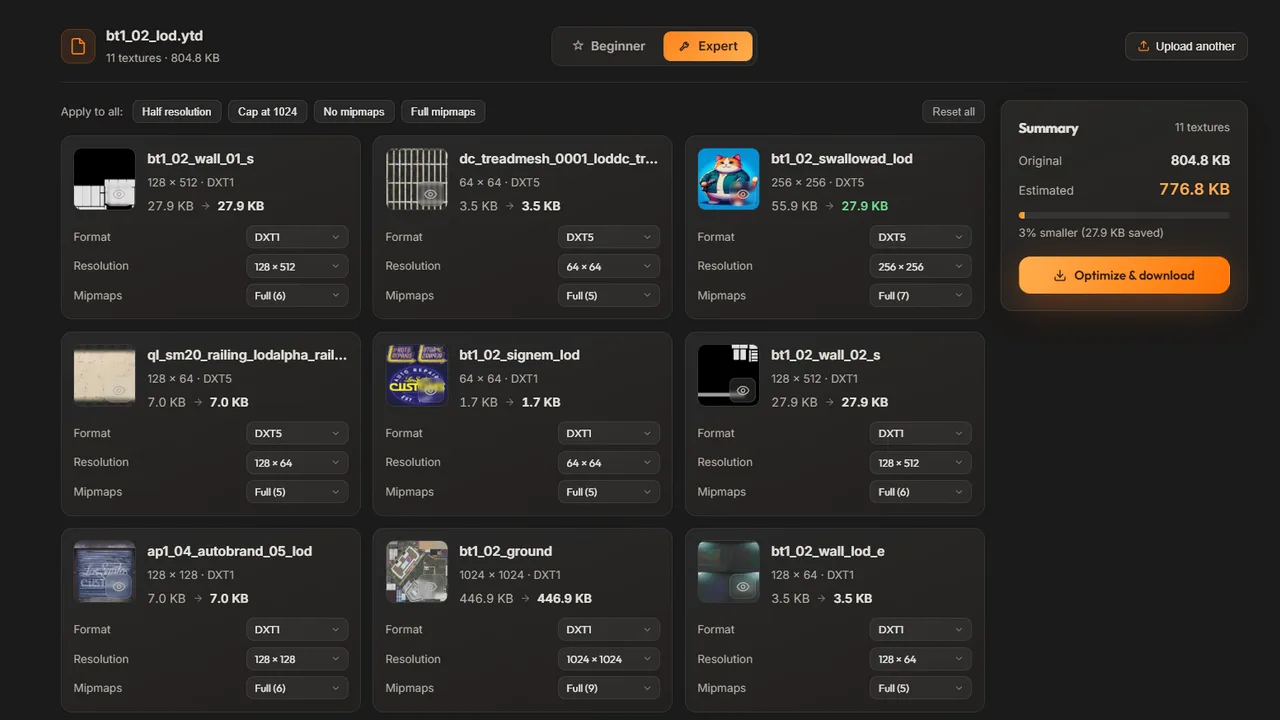
.ytd with its resolution, format, mipmaps and size. Free accounts can view this list but not change it.No warnings, but still texture loss?
Then no single file is over the line, but the total may be. Many medium-sized files in one spot, such as a custom building next to a lot full of add-on cars, add up. On a test server, stop the resources you suspect one at a time and check whether the problem goes away in that spot.
The server-side fix: shrink oversized textures
The goal is to make textures smaller in memory, not just on disk. A texture's memory comes down to three things:
- Resolution. Halve the width and height and the texture needs a quarter of the memory. A 4096 × 4096 DXT5 texture with mipmaps takes 21.3 MiB. At 2048 × 2048 it takes 5.3 MiB.
- Format. DXT1 takes half the memory of DXT5. Use it for every texture without transparency, and keep DXT5 for glass, decals and other see-through parts. Leave normal maps in the format they already use.
- Mipmaps. Keep them. They add a third to a texture's memory, but without them distant surfaces shimmer.
The sign from the warning above shows what that's worth: redone as a 2048 × 2048 DXT1 with mipmaps, it takes 2.7 MiB instead of 16.8 MiB.
The step-by-step guide to optimizing YTD files covers the full math, every texture format, the manual method with OpenIV or CodeWalker, and before/after numbers from real files. The YTD Optimizer does the work for a whole file: its presets cap the resolution and switch textures without transparency to DXT1, and you download a smaller .ytd with the same name.
Upload a .ytd to see every texture and its size, then download a smaller file with the same name.
The optimizer removes one cause of texture loss: oversized textures in .ytd files. It can't change players' settings, and it doesn't open .yft or .ydr model files that carry their own textures. A preset can also leave a very large file over the line, so check the console after every change.
One more limit: the optimizer reads and writes the PC Legacy (Gen8, RSC7) format that classic FiveM servers use. FiveM for GTA V Enhanced loads assets from stream_enhanced, and Cfx.re offers a converter called Alchemist. Compatibility of the optimized files with Enhanced servers hasn't been verified. For how textures, models and archetypes fit together, see our guide to GTA V file formats.
Splitting a YTD vs compressing it
A common workaround is to split one big texture dictionary into several smaller files. The warning is counted per file, so splitting can make it go away. But a model still needs all of its textures when it's on screen, so the same amount of memory gets used. The warning is gone and the cause is still there.
Compressing is different. A lower resolution, and DXT1 where there's no transparency, make the textures themselves smaller, which is what the memory budget cares about.
A texture budget checklist for server owners
- After you add or update any resource with streamed files, restart it and read the console: look for lines such as
uses 42.0 MiB of physical memoryand for a warning count on theStarted resourceline. - Fix the biggest numbers first, and look for single huge textures. One 4096 × 4096 DXT5 texture is over 16 MiB on its own.
- Aim for less than 16 MiB of texture data in each
.ytd. - Use DXT1 for every texture without transparency, and DXT5 only where you need it.
- Keep mipmaps, and leave normal maps in their format.
- Watch the total, not just each file. Twenty add-on cars at 15 MiB each can need 300 MiB when they're all parked in one place.
- Keep the original files, and reconnect to check glass, decals and close-up surfaces after every change.
- For many packs, Supporters can run a whole resource folder through the optimizer at once, up to 50
.ytdfiles per batch.
Frequently asked questions
What causes texture loss in FiveM?
Usually the game cannot fit everything around you into its streaming memory budget, so some textures stay blurry and some models do not render. Your graphics settings and your PC set part of that budget, and a server that streams oversized custom textures uses it up faster for everyone who joins.
What should Extended Texture Budget be set to?
There is no single best value, because it depends on how much video memory your graphics card has. Raise it in small steps under Settings > Graphics and keep the highest step at which the game still runs smoothly.
Is 16 MB a hard limit for FiveM assets?
No. The server warns when a streamed file declares more than 16 MiB of physical or virtual memory, adds a stronger sentence above 48 MiB, and still streams the file. Cfx.re forum guides use 16 MiB of texture data per .ytd as the target.
Why do I only get texture loss on one server?
Each server streams its own custom cars, clothing and maps. If one server ships textures that are much bigger than they need to be, they fill the memory budget faster, so you can see texture loss there with settings that work fine elsewhere. Report the spot to the server staff so they can check their files.
Does the YTD Optimizer fix texture loss?
Not on its own. It shrinks one common cause, oversized textures in .ytd files, by capping their resolution and using DXT1 where there is no transparency. Player settings, model files such as .yft and .ydr, and the total load of a busy area are outside what it changes.
Try the YTD Optimizer
Shrink your GTA V texture dictionaries. Upload a .ytd, see every texture and its size, then re-compress with smart presets or tune each texture by hand. Free every day, unlimited for Supporters.
Open the YTD Optimizer