
GTA 5 File Formats Explained: YDR, YDD, YFT, YTD, YTYP
You will know what every file in a FiveM resource does, which ones a prop, ped, weapon or minimap needs, and how to tell a Legacy file from an Enhanced one.
GTA 5 file formats are the compiled files that the game's RAGE engine streams. Three of them hold models: a .ydr holds one model, a .ydd holds a dictionary of models, and a .yft holds a model with a skeleton and physics. A .ytd holds textures, and a .ytyp registers new model names with the game. Next to them sit plain XML .meta files that set up vehicles, peds, weapons and handling. In a FiveM resource, the compiled files go in the stream folder, and data_file lines in fxmanifest.lua load the .meta files and any .ytyp.
GTA 5 file formats at a glance
| Extension | What it holds | Where you meet it in FiveM |
|---|---|---|
.ydr | Drawable: one model, optionally with its own textures and collision | Props, weapons |
.ydd | Drawable dictionary: several named models in one file | Ped body parts, the pause map road layer |
.yft | Fragment: a model with a skeleton and physics | Vehicles, ped skeletons |
.ytd | Texture dictionary | Vehicle, ped and minimap textures |
.ytyp | Archetypes: model names, draw distances, texture and collision links | Props, interiors (MLOs) |
.ymap | Placements: which models stand where in the world | Map edits, interiors |
.ybn | Static collision | Map edits, interiors |
.ymt | Metadata, such as a ped's component setup | Peds |
.gfx | Scaleform UI movie | HUD, weapon wheel, Cayo Perico map |
.meta | Plain XML settings | Vehicles, handling, peds, weapons |
.ycd | Clip dictionary: animations | Custom animations and emotes |
.ypt | Particle effects | Custom effects |
.awc | Audio wave container | Custom sounds, sirens and radio |
.rpf | Archive that packs many files | The game's own files: unpack what you need |
YDR files: single models for props and weapons
A YDR file (a drawable) is one model: its meshes, its shaders and, optionally, its own texture dictionary and collision. The YDR file format can hold up to four detail levels (high, medium, low and very low), and the game switches between them by distance. Most custom props and every weapon model are YDRs.
The file name is the model name. stream/my_chair.ydr gives you a model called my_chair, and scripts load it by its hash: GetHashKey('my_chair'). This is also how replacements work: stream a file with a base-game name and it replaces that model. Give every custom model a unique name, and check it against the base-game objects, peds and vehicles in our Game Assets library.
The Prop Creator writes one YDR per prop with its textures (and collision, if you pick one) embedded, so a prop export has no separate .ytd. It writes only the high-detail model: instead of lower-detail levels, you set the draw distance. The Weapon Creator (beta) also writes one YDR per weapon, with embedded textures and no collision.
YDD files: model dictionaries for peds and the minimap
A YDD file packs several drawables into one dictionary, each under its own name. A ped's visible body lives in <model>.ydd, split into components the game can swap: head_000_r, uppr_000_u (upper body), lowr_000_u (legs) and so on. The Ped Creator (beta) puts the main body in head_000_r and gives each extra material with its own textures a separate component, up to eight.
The minimap uses YDDs too. On the pause map, GTA draws a vector road layer from minimap_X_Y.ydd files, which would show the stock roads on top of a custom map. That's why every Minimap Live Editor export ships 65 blank ones, 461 bytes each, that replace them.
YFT files: models with a skeleton and physics
A YFT file (a fragment) is a model plus a skeleton and physics data, so its parts can move, bend or break off. Every vehicle is a YFT: doors, wheels and bumpers are fragment parts. An add-on car usually ships as <model>.yft plus a higher-detail <model>_hi.yft, with its textures in <model>.ytd and <model>+hi.ytd.
Peds use a YFT for the skeleton, while the meshes stay in the YDD. The Ped Creator starts from a GTA V ped's YFT (ig_bankman for humans, or the matching animal, such as a_c_rottweiler for a large dog) and patches in your model's skeleton.
YTD files: texture dictionaries
A YTD file is a texture dictionary: a set of named textures, each with a size, a compression format and a chain of mipmaps (smaller copies used at a distance). Models find their textures by name, so renaming a texture inside a YTD breaks the link.
You'll find YTDs everywhere: adder.ytd for a car, <model>.ytd for a ped (with names like head_diff_000_a_whi and head_normal_000), and minimap_sea_0_0.ytd to minimap_sea_2_1.ytd for the six minimap tiles. A YTD can also be shared by many models: each archetype in a YTYP names the texture dictionary it uses.
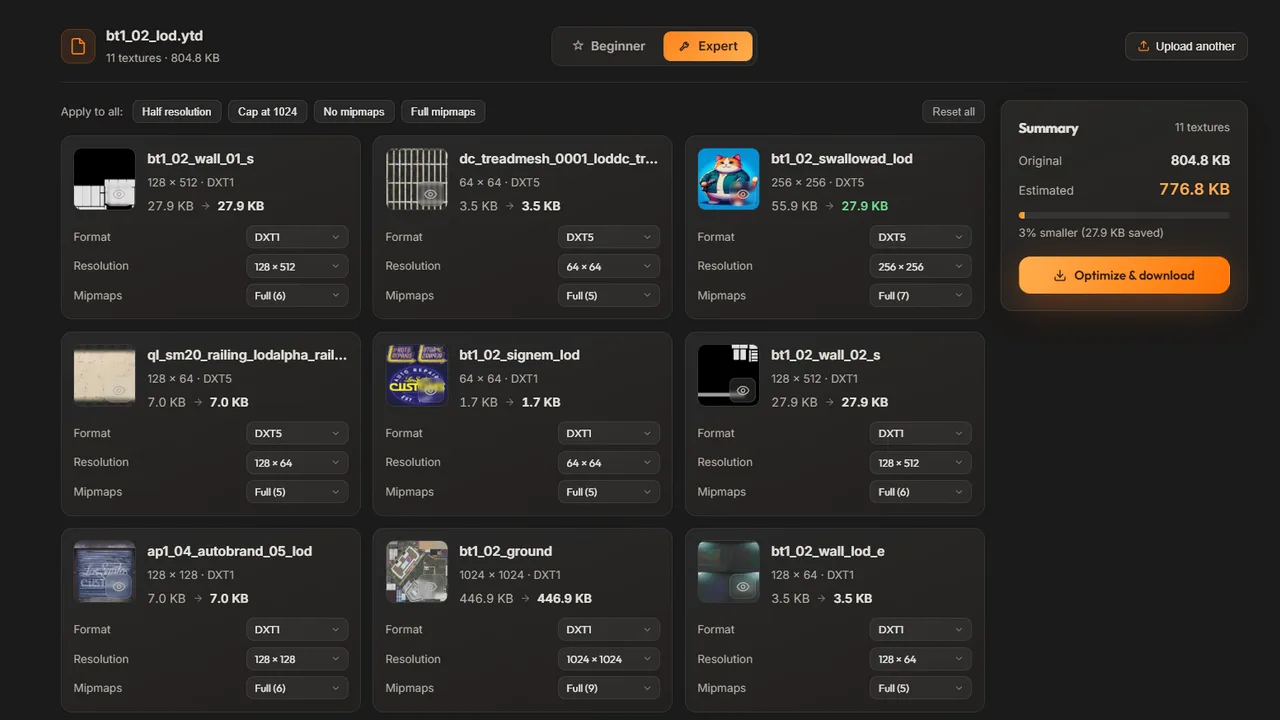
bt1_02_lod.ytd in the YTD Optimizer: each texture has its own resolution, format and mipmap count.A YTD is compressed on disk, so its file size says little about the memory it needs in game, which depends on each texture's resolution and format. DXT1 uses 4 bits per pixel (no smooth transparency), DXT5 uses 8 bits with a full alpha channel, and uncompressed A8R8G8B8 uses 32 bits. With a full mipmap chain, which adds about a third, one square texture needs:
| Resolution | DXT1 | DXT5 | A8R8G8B8 |
|---|---|---|---|
| 1024 × 1024 | 0.67 MiB | 1.33 MiB | 5.33 MiB |
| 2048 × 2048 | 2.67 MiB | 5.33 MiB | 21.33 MiB |
| 4096 × 4096 | 10.67 MiB | 21.33 MiB | 85.33 MiB |
Two rules follow. Halving the width and height cuts the memory to a quarter, and an uncompressed texture costs four times as much as a DXT5 one of the same size. When textures vanish or blur on a busy server, oversized dictionaries are a common cause: see how to fix texture loss in FiveM and how to optimize YTD files. The YTD Optimizer shows the size of each texture in a Legacy .ytd and re-compresses the dictionary for you.
YTYP and YMAP files: registering and placing models
A YTYP file holds archetypes, one per model. Each archetype tells the game the model's name, its draw distance (lodDist), its bounding box and sphere, the distance at which HD textures load (hdTextureDist), and which texture dictionary and collision to use. Base-game models already have archetypes. A brand-new prop name has none until a YTYP registers it.
In FiveM, streaming the YTYP isn't enough. The manifest has to request it:
data_file 'DLC_ITYP_REQUEST' 'stream/my_props.ytyp'Without that line, the archetypes are never registered: the props stay invisible and CreateObject fails. The Prop Creator writes one YTYP per resource with an archetype for every prop, plus this line. Our YTYP guide covers the fields in detail.
A YMAP file places archetypes in the world: which model, at what position and rotation. Use one to put props on the map permanently, and spawn props from a script when they come and go. CodeWalker is the usual YMAP editor.
YMT, YBN and GFX: metadata, collision and UI
YMT files hold metadata. For a ped, <model>.ymt describes the component setup: which drawables and texture variations each body slot has. The Ped Creator ships the same small 939-byte template with every ped.
YBN files are static collision, mostly used by map edits and interiors. A prop can carry its collision inside the YDR instead, which is how the Prop Creator does it: a box (or none) on the free plan, a mesh or custom shapes for Supporters.
GFX files are Scaleform UI movies. The Minimap Live Editor ships int3232302352.gfx, the Cayo Perico map, in every export. The Weapon Creator can ship a patched hud.gfx for weapon wheel icons. That option is in beta and built for game build 3889, and only one hud.gfx works per server. FiveM streams .gfx files from stream without a manifest line.
.meta files: the XML that sets things up
A .meta file is plain XML that you can open in any text editor. It isn't streamed: FiveM loads it through a data_file line that names the type of data it holds. The common ones:
vehicles.meta: each vehicle model with its texture dictionary,handlingId, layout and class.handling.meta: driving physics such as mass, grip, power and brakes, one entry perhandlingName.carcols.meta(mod kits and sirens),carvariations.meta(each model's colors and mod kit) andvehiclelayouts.meta(seats and entry animations).peds.meta: ped definitions, such as the ped type, movement clips and personality.weapons.meta,weaponarchetypes.meta,weaponanimations.metaandpedpersonality.meta: a weapon's stats, its model registration, its animations and how peds move while holding it.
The exact data_file line for each type is in our fxmanifest.lua guide, and every handling field is explained in handling.meta explained.
Which files each FiveM resource needs
| Resource | In stream/ | Outside stream/ | Manifest lines |
|---|---|---|---|
| Props | One .ydr per prop, one .ytyp | cleanup.lua | this_is_a_map, DLC_ITYP_REQUEST |
| Peds | .yft, .ydd, .ytd and .ymt per ped | peds.meta | PED_METADATA_FILE |
| Weapons | One .ydr per weapon, optional hud.gfx | Four .meta files per weapon in meta/<model>/, cl_weaponNames.lua | Four data_file lines per weapon |
| Handling | Nothing | meta/<name>_handling.meta | HANDLING_FILE |
| Minimap | 13 .ytd, 65 .ydd, 1 .gfx | config.lua, map.lua | No data_file line, only scripts |
| Add-on car | .yft, _hi.yft, .ytd, +hi.ytd | Up to five .meta files | One data_file line per .meta |
A ped export from the Ped Creator uses four of the binary formats at once:
my_peds/
  fxmanifest.lua
  peds.meta          ped definition, loaded by PED_METADATA_FILE
  README.txt
  stream/
    my_ped.yft       skeleton
    my_ped.ydd       meshes: head_000_r, uppr_000_u ...
    my_ped.ytd       textures: head_diff_000_a_whi, head_normal_000 ...
    my_ped.ymt       component setup
The resource folder goes in your server's resources folder, and one line in server.cfg starts it: ensure my_peds. For step-by-step guides, read how to add custom props, how to make a custom ped, how to make custom weapons and how to make a custom minimap.
Legacy vs Enhanced: two versions of the same formats
GTA V Enhanced, the newer PC edition, uses updated (Gen9) versions of these formats. The extensions and the RSC7 signature at the start of each file stay the same, but the version number right after it differs:
| Format | Legacy (Gen8) version | Enhanced (Gen9) version |
|---|---|---|
.ydr | 165 | 159 |
.ydd | 165 | 159 |
.yft | 162 | 171 |
.ytd | 13 | 5 |
To check a file, open it in a hex editor. Bytes 0 to 3 spell RSC7, and bytes 4 to 7 hold the version, lowest byte first, so a Legacy YTD starts with 52 53 43 37 0D 00 00 00. If the first four bytes read FXAP instead, the file is an encrypted asset from the Cfx.re escrow system, and editors can't open it.
FiveM for GTA V Enhanced loads assets from a stream_enhanced folder. When a resource has none, it falls back to stream, which the Cfx.re Legacy vs Enhanced docs call deprecated: Gen8 assets belong in stream and Gen9 assets in stream_enhanced. To convert files, Cfx.re offers Alchemist, a Windows app whose docs list YDR, YDD, YFT, YTD and YPT files. It can't convert escrowed assets.
Tools to open and make GTA 5 files
| Tool | What it is | Use it to |
|---|---|---|
| OpenIV | Windows archive manager for GTA V | Open the game's RPF archives, preview models and textures, and extract or replace files |
| CodeWalker | Windows world explorer and map editor | Browse the archives, view the game world, and edit YMAP and YTYP files |
| Sollumz | Blender add-on | Import and export YDR, YDD and YFT models and their collision, so you can edit them in Blender |
Without desktop tools, the Prop Creator, Ped Creator (beta) and Weapon Creator (beta) turn a .glb, .gltf, .obj, .fbx or .stl model into the files above, and the Handling Editor writes handling.meta. They need a Discord sign-in, and free accounts get one export per tool per day, reset at midnight UTC. Supporter ($15/month) removes that limit.
Turn a GLB, OBJ, FBX or STL model into a FiveM prop resource with YDRs, a YTYP and the manifest, without Blender.
Frequently asked questions
What is the difference between YDR, YDD and YFT files?
All three hold models. A YDR is a single model, such as a prop or a weapon. A YDD packs several named models into one file, which is how a ped's body parts are stored. A YFT adds a skeleton and physics so parts can move or break off, which is why every vehicle is a YFT.
Can FiveM load OBJ, FBX or GLB models directly?
No. FiveM streams compiled GTA V formats only, so a model has to be converted to a YDR, YDD or YFT, with its textures in a YTD or embedded in the model, before the game can use it. Blender with the Sollumz add-on can do that conversion, and so can the Prop, Ped and Weapon Creators on this site.
How do I open or edit a YDR, YDD or YFT file?
To view one, use OpenIV or CodeWalker on Windows: both preview GTA V models and textures. To edit it, import it into Blender with the Sollumz add-on, change it and export it back to the same format. Blender can also export the mesh as OBJ or FBX for other 3D programs.
Where does GTA 5 keep its YDR and YTD files?
Packed inside RPF archives in the game folder, often one inside another: the stock pistol model, w_pi_pistol.ydr, sits in weapons.rpf inside the dlc.rpf of the patchday8ng DLC pack. OpenIV and CodeWalker can browse these archives and extract single files. For FiveM you never edit the archives: your own files go in a resource folder on the server.
How big can a YTD file be in FiveM?
What matters is the memory the textures need once loaded, not the file size on disk, because a YTD is compressed. Community guides on the Cfx.re forum aim to keep each texture dictionary under 16 MB of physical memory, because oversized assets can cause streaming problems such as texture loss. A single 4096 px DXT5 texture with mipmaps needs about 21 MiB, more than that whole budget on its own.