handling.meta Explained: The GTA V Handling Fields That Matter
By the end you will know what each CHandlingData field controls, what normal stock values look like, and how to get an edited handling.meta working on your FiveM server.
handling.meta is the GTA V file that decides how a vehicle accelerates, grips, brakes, leans and takes damage. On a FiveM server, it is the file you edit to change how a car drives. Below is handling.meta explained field by field, with typical values from the stock handling of 916 GTA V vehicles built into the Handling Editor, so you can see what normal looks like before you change anything. After the fields, you will see how FiveM loads the file and the naming rule that decides whether your edit is used at all.
handling.meta explained: what the file does
handling.meta is a plain XML file that any text editor can open, unlike the compiled .yft and .ytd files a car streams (see our guide to GTA 5 file formats). Inside a CHandlingDataMgr root, each <Item type="CHandlingData"> holds one handling entry: a handlingName followed by about 50 values. One file can hold one entry or many.
Vehicles don't point at a file. Each vehicle's entry in vehicles.meta has a <handlingId>, and the game uses the handling entry whose handlingName matches it. In the words of the GTA modding wiki, the handlingName "is used by the vehicles.meta file to identify the handling line of the vehicle." That wiki is also the source of the field meanings below.
Here is the start of a file the Handling Editor exports for the stock Adder. Most field names start with a prefix that tells you the type: f is a decimal number, n a whole number, vec an x/y/z vector and str a text value.
<?xml version="1.0" encoding="UTF-8"?>
<CHandlingDataMgr>
  <HandlingData>
    <Item type="CHandlingData">
      <handlingName>adder</handlingName>

      <!-- Physics -->
      <fMass value="1800.000000" />
      <fInitialDragCoeff value="7.800000" />
      <fDownforceModifier value="0.000000" />
      <fPercentSubmerged value="85.000000" />
      <vecCentreOfMassOffset x="0.000000" y="0.000000" z="0.000000" />
      <vecInertiaMultiplier x="1.000000" y="1.300000" z="1.500000" />

      <!-- Transmission -->
      <fDriveBiasFront value="0.200000" />
      <nInitialDriveGears value="6" />
      <fInitialDriveForce value="0.320000" />
      <!-- ...brakes, steering, traction, suspension, damage and misc fields... -->

      <!-- Flags -->
      <strModelFlags>440010</strModelFlags>
      <strHandlingFlags>0</strHandlingFlags>
      <strDamageFlags>0</strDamageFlags>
      <AIHandling>AVERAGE</AIHandling>

    </Item>
  </HandlingData>
</CHandlingDataMgr>
Physics: mass, drag and downforce
In the tables below, "typical" means the middle 80% of 692 stock land vehicles (cars, SUVs, vans, trucks and the like; aircraft, boats, trains, trailers, motorcycles and bicycles left out), with the median in brackets.
| Field | What it does | Typical stock value |
|---|---|---|
fMass | Weight in kilograms. The wiki says it is only used when the vehicle collides with another vehicle or a non-static object. | 1,100 to 5,500 (1,675) |
fInitialDragCoeff | Air drag, which grows with speed squared. Higher means more drag and a lower top speed. | 6 to 13 (9.2) |
fDownforceModifier | Extra grip at high speed. | Set on only 72 of the 692 |
fPercentSubmerged | How much of its height sinks in water before the vehicle floats. | 85 on 586 vehicles |
vecCentreOfMassOffset | Moves the center of mass, in meters. | 0, 0, 0 on the Adder |
vecInertiaMultiplier | Resistance to rotation around each axis. | 1, 1.3, 1.5 on the Adder |
Transmission: power, gears and top speed
| Field | What it does | Typical stock value |
|---|---|---|
fDriveBiasFront | Share of drive force sent to the front axle: 0.0 is RWD, 1.0 is FWD, anything between is AWD. | 0.0 on 431, 1.0 on 26, between on 235 |
nInitialDriveGears | Number of forward gears (1 to 10 in current game versions). | 5 on 301; 4 or 6 on most others |
fInitialDriveForce | Drive force at the wheels. 1.0 leaves the game's calculation unchanged. | 0.14 to 0.37 (0.27) |
fDriveInertia | How fast the engine revs. Bigger means a quicker redline. | 1.0 on 616 |
fClutchChangeRateScaleUpShift, ...DownShift | Shift speed. Bigger is faster; 1 is about 0.9 seconds per shift. | 1.3 to 6 (about 2) |
fInitialDriveMaxFlatVel | Speed at redline in top gear, which works like the final drive. | 110 to 159 (140) |
fInitialDriveForce and fInitialDriveMaxFlatVel
These two are the usual "make it faster" fields. fInitialDriveForce is how hard the engine pushes, so it shapes acceleration. fInitialDriveMaxFlatVel sets where top gear runs out. The wiki's rule of thumb is about 0.82 times the value in mph or 1.32 times in km/h, so the Adder's 160 works out near 131 mph. The wiki also warns that setting it "does not guarantee the vehicle will reach this speed": drag and power still decide.
Our fDriveBiasFront guide to AWD, FWD and RWD counts how stock cars use the drive bias, including Rockstar's drift cars.
Brakes and steering
| Field | What it does | Typical stock value |
|---|---|---|
fBrakeForce | Braking strength. Bigger brakes harder; 1.0 leaves the game's calculation unchanged. | 0.25 to 1.0 (0.7) |
fBrakeBiasFront | Brake split: 0.0 is rear only, 1.0 front only, 0.5 equal. | 0.425 to 0.65 (0.6) |
fHandBrakeForce | Handbrake strength. Bigger brakes harder. | 0.3 to 0.8 (0.5) |
fSteeringLock | Maximum angle the steered wheels turn, in degrees. | 35 to 42.5 (40) |
Only 24 stock land vehicles go above 50 degrees of steering lock, and all 24 are Rockstar's drift versions (68 to 80.5 degrees).
Traction: the grip curve
GTA treats grip as a curve. A tire builds grip up to a peak, then drops to a lower sliding grip once it breaks loose, so the gap between the two numbers is how much grip the car loses when it slides.
| Field | What it does | Typical stock value |
|---|---|---|
fTractionCurveMax | Peak grip before the tires slide. | 1.6 to 2.65 (2.18) |
fTractionCurveMin | Grip while sliding: wheelspin, oversteer, understeer. | 1.45 to 2.5 (1.86) |
fTractionCurveLateral | Shape of the sideways grip curve; peak grip comes at half this many degrees of slide. | 17 to 22.5 (22.5) |
fTractionSpringDeltaMax | Maximum sideways travel of the tire sidewall, in meters. | 0.1 to 0.15 (0.15) |
fLowSpeedTractionLossMult | Grip lost at low speed, mainly burnouts. 0.0 means normal grip. | 0 to 1.3 (1.0) |
fCamberStiffnesss | How much the vehicle is pushed toward its roll direction. The name really has three s's. | 0 on all 692; only motorcycles set it |
fTractionBiasFront | Grip split between the axles. Keep it between 0.01 and 0.99: the wiki says 0.0 or 1.0 leaves the vehicle with no traction. | 0.47 to 0.5 (0.488) |
fTractionLossMult | How much grip changes between surfaces such as asphalt and mud. | 0.15 to 1.0 (1.0) |
fTractionCurveMax and fTractionCurveMin
Raise both to add grip everywhere. Lower the min, or widen the gap, and the car loses more grip once it starts to slide. All 24 of Rockstar's drift versions use 1.53 for the max and 1.52 or 1.525 for the min, which leaves almost no gap between peak and sliding grip. The stock futo uses 2.05 and 1.75; driftfuto uses 1.53 and 1.525.
Suspension and anti-roll
| Field | What it does | Typical stock value |
|---|---|---|
fSuspensionForce | Spring strength. | 1.25 to 2.65 (2.0) |
fSuspensionCompDamp | Damping as the spring compresses. Bigger is stiffer. | 0.8 to 1.7 (1.25) |
fSuspensionReboundDamp | Damping as the spring extends. Bigger is stiffer. | 1.2 to 3.2 (2.04) |
fSuspensionUpperLimit, fSuspensionLowerLimit | How far the wheels can move up and down from rest. | 0.05 to 0.19 up, -0.2 to -0.08 down |
fSuspensionRaise | Raises the body off the wheels. | 0 on 585 (stock range -0.05 to 0.15) |
fSuspensionBiasFront | Above 0.5 the front is stiffer, below 0.5 the rear. | 0.46 to 0.54 (0.5) |
fAntiRollBarForce | Anti-roll bar strength. Larger means less body roll. | 0.14 to 0.95 (0.63) |
fAntiRollBarBiasFront | Front and rear split of the anti-roll bar. | 0.3 to 0.65 (0.54) |
fRollCentreHeightFront, ...Rear | Roll center height of each axle, in meters above the road. | 0.1 to 0.5 (0.24) |
Damage, fuel and other fields
| Field | What it does | Typical stock value |
|---|---|---|
fCollisionDamageMult | Collision damage multiplier: 0 is none, 10 is ten times. | 0.7 to 1.0 (1.0) |
fWeaponDamageMult | Weapon damage multiplier. | 1.0 on 621 |
fDeformationDamageMult | Visual deformation multiplier. | 0.6 to 0.8 (0.7) |
fEngineDamageMult | Engine damage multiplier, up to engine failure or explosion. | 1.4 to 1.5 (1.5) |
fPetrolTankVolume | Fuel that leaks when the tank is shot. | 60 to 80 (65) |
fOilVolume | Oil volume. Its in-game effect isn't well documented. | 5 to 8 (5) |
fSeatOffsetDistX, Y, Z | Distance from the door to the seat, on each axis. | 0, 0, 0 on the Adder |
nMonetaryValue | The vehicle's worth. | 25,000 to 150,000 (40,000) |
Flags and AIHandling
strModelFlags, strHandlingFlags and strDamageFlags are bit masks written as hex text: each bit switches one behavior on. Flags combine by adding them as hexadecimal numbers, so 20000 plus 2 is 20002. Model flags affect model-related functions, handling flags affect handling-related functions, and damage flags mark doors that can't break off. Across all 916 stock entries, the most common values are 440010 for model flags (516 entries), 0 for handling flags (409) and 0 for damage flags (602).
AIHandling picks the driving profile AI drivers use for the vehicle: AVERAGE on 737 stock entries, TRUCK on 83, SPORTS_CAR on 79 and CRAP on 17. The wiki recommends AVERAGE for boats, bikes and aircraft.
Stock GTA 5 handling.meta values for five cars
This table puts five stock cars side by side, covering rear-, front- and all-wheel drive. Use them as a reference point when your own numbers look strange.
| Field | adder | sultan | futo | blista | baller |
|---|---|---|---|---|---|
handlingName | ADDER | SULTAN | FUTO | BLISTA | BALLER |
fMass | 1800 | 1400 | 900 | 1200 | 2400 |
fInitialDragCoeff | 7.8 | 8 | 6.5 | 8 | 8 |
fDriveBiasFront | 0.2 | 0.4 | 0.0 | 1.0 | 0.6 |
nInitialDriveGears | 6 | 5 | 5 | 5 | 5 |
fInitialDriveForce | 0.32 | 0.26 | 0.29 | 0.23 | 0.21 |
fInitialDriveMaxFlatVel | 160 | 145 | 135 | 135 | 130 |
fBrakeForce | 1.0 | 0.4 | 0.5 | 0.6 | 0.6 |
fBrakeBiasFront | 0.45 | 0.65 | 0.55 | 0.65 | 0.65 |
fSteeringLock | 42 | 35 | 50 | 36 | 35 |
fTractionCurveMax | 2.5 | 2.35 | 2.05 | 2.05 | 1.9 |
fTractionCurveMin | 2.38 | 1.95 | 1.75 | 1.75 | 1.55 |
fLowSpeedTractionLossMult | 1.5 | 1.4 | 1.0 | 0.7 | 1.5 |
fSuspensionForce | 2.4 | 2.8 | 3.0 | 2.2 | 1.4 |
fAntiRollBarForce | 0.9 | 0.3 | 0.5 | 1.0 | 0.9 |
AIHandling | AVERAGE | AVERAGE | SPORTS_CAR | AVERAGE | AVERAGE |
How FiveM loads a handling.meta
A handling.meta does nothing until a resource loads it. In fxmanifest.lua you list the file under files and register it with a data_file 'HANDLING_FILE' line. This is the resource the Handling Editor exports for a vehicle named adder:
adder_handling/
├── fxmanifest.lua
├── README.txt
└── meta/
    └── adder_handling.meta
fx_version 'cerulean'
game 'gta5'
author 'FiveM-Tools.com'
description 'adder_handling - custom handling (generated by fivem-tools.com)'
files {
'meta/*.meta'
}
data_file 'HANDLING_FILE' 'meta/adder_handling.meta'To install it, follow the three steps in the README.txt inside the zip:
- Drop the
adder_handlingfolder into your server'sresources/folder. - Add
ensure adder_handlingtoserver.cfg. - Restart the server.
To add more vehicles to the same resource, put their .meta files in meta/ and add one data_file 'HANDLING_FILE' line per file.
When your handlingName matches a stock entry, your values replace the stock ones for every vehicle that uses that name. For an add-on car, the handling.meta normally ships inside the car's own resource next to its vehicles.meta. Our fxmanifest.lua guide covers the other data_file lines a vehicle resource needs.
handlingName must match handlingId
The game finds handling by name, so the handlingName in your file must be the handlingId from that vehicle's vehicles.meta. If the two differ, your entry loads and nothing uses it. For stock vehicles, the handling name is often not the spawn name: 165 of the 916 stock vehicles use a different one. These are the police, emergency and taxi models where that happens:
| Spawn name | Handling name |
|---|---|
ambulance | AMBULAN |
police4, police5 | police |
policeold1, policeold2 | POLICEOLD, POLICEOL2 |
polbuffalo, polbuffalo6 | POLBUFFALO2, POLBUFFALO4 |
polcaracara | POLCARACARA2 |
sheriff2 | fbi2 |
taxi | TAXI2 |
Popular cars do it too: comet2 uses COMET, carbonizzare uses CARBONIZ, cavalcade uses CAVCADE and tailgater uses TAILGATE. Names are also shared: 82 stock handling names cover two or more models. BURRITO is used by burrito through burrito5, so one edit changes all five vans, and an edit to fbi2 also changes sheriff2.
The GTA modding wiki says a handling name can be at most 16 characters; the longest stock names, VORSCHLAGHAMMER and DRIFTDOMINATOR9, have 15. Our GTA V vehicle list shows the handling name on every stock vehicle where it differs from the spawn name. For an add-on car, look in the car's own vehicles.meta.
Troubleshooting: handling.meta changes not working
If an edit doesn't show up in game, check these in order:
- The
handlingNamematches the vehicle'shandlingId. - The
data_file 'HANDLING_FILE'path points at the real file, and the file is listed underfiles. - The resource is in
server.cfgwithensure, and you restarted the server after the change. - No other resource, such as a handling pack or the car's own resource, defines the same handling name.
- The XML is well formed: every tag is closed and every value is in quotes.
How to edit handling.meta with the Handling Editor
Any text editor can change the numbers. The Handling Editor adds stock starting points, presets and an export that is ready to install. You sign in with Discord, and your projects save automatically.
- Create a project. Type a Vehicle name, choose Car or Bike (you can't switch later) and click Create project. If the name is a stock spawn name such as
adder, the project starts from that vehicle's stock handling. You can also drop your own handling.meta (.meta or .xml, up to 2 MB) on "Drop your handling.meta here". - Pick a Base Handling. Search any of the 916 stock vehicles, or use Load from file, to change the values you start from.
- Set the Drivetrain (cars only). Front Wheel Drive, All Wheel Drive and Rear Wheel Drive write
fDriveBiasFront1.0, 0.5 and 0.0. - Apply a Style Override. Each preset sets a few fields to fixed values: Supercar, Sports, Drift, Off-road, Muscle, Lowrider, Track and Rally for cars; Sport Bike, Cruiser, Chopper, Dirt Bike and Scooter for bikes. Click the active preset again to remove it.
- Tune. Basic mode has four sliders from 50% to 150%: Speed scales
fInitialDriveMaxFlatVelandfInitialDriveForce, Grip scalesfTractionCurveMaxandfTractionCurveMin, Brakes scalesfBrakeForceand Weight scalesfMass. Advanced mode (Supporter) adds 17 sliders for gears, shifting, suspension, damage and more. - Export. Choose "FiveM Resource" for the zip shown earlier, or "handling.meta only" for the bare XML file.
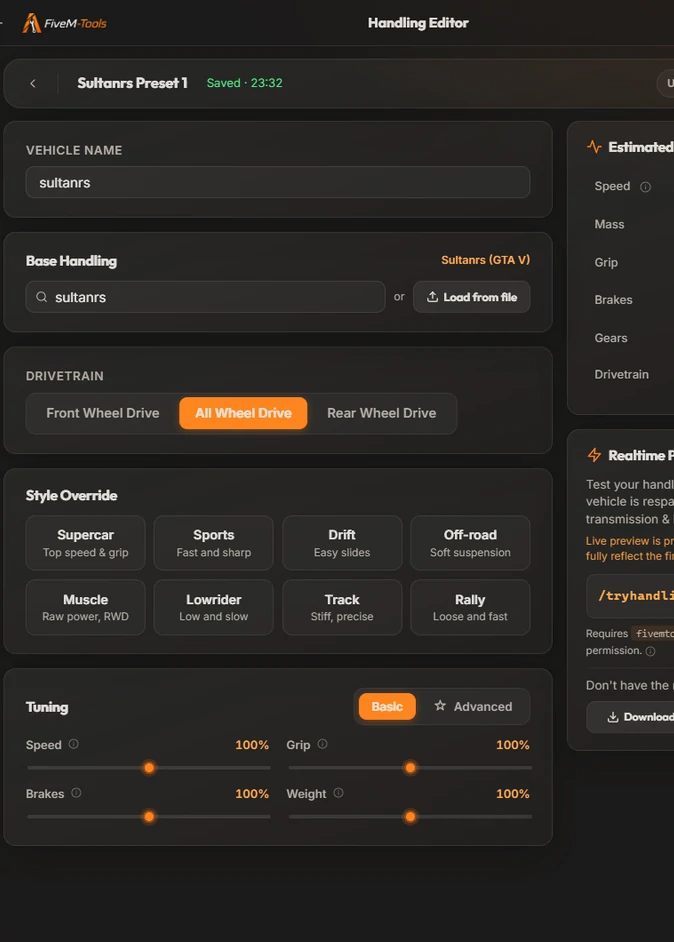
sultanrs, whose stock fDriveBiasFront is 0.25. The Drivetrain switch reads All Wheel Drive.A few things to know before you export:
- The Vehicle name becomes the exported
handlingName. For a stock vehicle whose handling name differs, such as the ambulance, keep the spawn name in the editor so the stock values load, then change<handlingName>in the exported file toAMBULAN. - Choosing a preset, a base or a drivetrain resets
fDriveBiasFrontto 0, 0.5 or 1.0, and the Drivetrain switch wins over a preset's own bias. Drift and Muscle only end up rear-wheel drive when Rear Wheel Drive is selected. - Imports keep only the first
CHandlingDataitem in a file, andSubHandlingDatablocks (such asCCarHandlingData) are dropped. The three flag fields pass through unchanged; there is no flag picker. - A file dropped on the project hub always opens as a Car project. For a bike file, create a Bike project and use Load from file.
- The Speed figure under Estimated In-Game Stats reads
fInitialDriveMaxFlatVelas km/h, so it is lower than the wiki's rule of thumb. Both are estimates.
Free accounts get one export per day (either format), reset at midnight UTC. Supporter ($15/month) removes the limit and adds Advanced mode. The editor also has a Realtime Preview, in beta, that respawns the car on your own FiveM server each time your project saves. The editor itself warns that the preview is prone to crashes and may not fully match the exported file. It is described on the Live Vehicle Handling Editor page.
Start from any of 916 stock GTA V vehicles, set the drivetrain, pick a preset, tune with sliders and export a ready FiveM resource.
Frequently asked questions
Why are my handling.meta changes not working in FiveM?
Usually it is the name. The handlingName in your file must equal the handlingId in the vehicle's vehicles.meta, and stock names often differ from spawn names (the ambulance reads AMBULAN). If the name is right, check the data_file 'HANDLING_FILE' line in fxmanifest.lua, that the resource is ensured in server.cfg and that you restarted the server.
How do I make a car faster in FiveM with handling.meta?
Raise fInitialDriveForce for harder acceleration and fInitialDriveMaxFlatVel for a higher top speed, and lower fInitialDragCoeff to cut air drag. If the extra power only spins the wheels, raise grip with fTractionCurveMax and fTractionCurveMin. Change one value at a time and test in game.
How do I make a drift car in FiveM with handling.meta?
Look at what Rockstar changed on its own 24 drift versions, such as driftfuto and drifttampa. All of them use a steering lock of 68 to 80.5 degrees, fTractionCurveMax 1.53 with fTractionCurveMin 1.52 or 1.525, fLowSpeedTractionLossMult 0, a drive force of about 0.61 to 0.73 and a small front drive bias of 0.05 to 0.25. Treat these as reference values rather than a tested recipe for every car, and change one value at a time in game.
Where do I find the original GTA 5 handling.meta values?
The base game file is in common\data inside the game archives, which OpenIV or CodeWalker can open; vehicles added in later updates keep their handling in their own DLC files. The Handling Editor also has the stock handling of 916 GTA V vehicles built in: type a spawn name such as adder when you create a project, or search for one under Base Handling.
Can I change handling without restarting my FiveM server?
The README in the Handling Editor's resource export says to restart the server after you install it. For testing, scripts can change a spawned vehicle's handling at runtime with the SetVehicleHandlingFloat native. The Handling Editor's Realtime Preview (beta) works that way and respawns your test car each time your project saves.
Try the Handling Editor
Tweak or build a GTA V handling.meta in your browser. Upload an existing file or start from scratch, pick a preset, choose your drivetrain, fine-tune with sliders and export a drop-in handling.meta. Free every day, unlimited for Supporters.
Open the Handling Editor