How to Make a Custom FiveM Ped From a 3D Model
You will end up with a drop-in resource folder holding your ped's skeleton, mesh, textures and peds.meta, started with one ensure line and spawned by its model name.
This guide shows how to make a custom ped for FiveM from a 3D model: a Mixamo character, a rigged GLB, or an unrigged FBX, OBJ or STL. You put the model on GTA V's own ped skeleton, check it with the game's animations, and export the files your server streams.
You need a model of one standing character that you may use on your server, a Discord account for the Ped Creator (in beta), and access to your server's resources folder. Blender, OpenIV and CodeWalker are not needed, though a 3D app helps if the model needs a new pose or fewer polygons.
What a FiveM add-on ped is made of
An add-on ped is four streamed files that share the model name, plus a peds.meta entry that tells the game the model exists and how it behaves. This is the folder the Ped Creator exports for a ped named swat_guy in a project called "Server peds":
server-peds/
├── fxmanifest.lua
├── peds.meta
├── README.txt
├── lod.lua            (only when you raise the detail distance)
└── stream/
    ├── swat_guy.yft
    ├── swat_guy.ydd
    ├── swat_guy.ytd
└── swat_guy.ymt| File | What it does |
|---|---|
stream/swat_guy.yft | The skeleton: GTA's 98-bone ped skeleton, taken from the base-game ped ig_bankman, with your character's bone positions written in. |
stream/swat_guy.ydd | The mesh, as a drawable dictionary with one drawable per component (head_000_r, uppr_000_u and so on, up to 8). It has to stay under 8 MB, about 99,000 vertices. |
stream/swat_guy.ytd | The textures: a diffuse, normal and specular map per component, compressed to DXT1, or to DXT5 when they have transparency. |
stream/swat_guy.ymt | The component setup, which tells the game which drawables and textures the ped has. |
peds.meta | One <Item> per ped: the model name plus its walk, capsule, personality and other behavior settings. |
fxmanifest.lua | Registers peds.meta with the game. |
This is the manifest the export writes for a single ped, line for line. The fxmanifest.lua guide explains what each line does.
fx_version 'cerulean'
game 'gta5'

author 'TeK - FiveM-Tools.com'
description 'Custom addon ped - swat_guy (generated by fivem-tools.com)'

files {
    'peds.meta',
}

data_file 'PED_METADATA_FILE' 'peds.meta'

-- ped model: swat_guy
FiveM streams every file in a resource's stream folder on its own, so the manifest only has to declare peds.meta, which sits in the resource root, not in stream. The <Name> in peds.meta must match the stream file names, and that name is what you spawn. Here is part of the entry, which copies GTA's ambient male profile:
<CPedModelInfo__InitDataList>
  <InitDatas>
    <Item>
      <Name>swat_guy</Name>
      <ClipDictionaryName>move_m@generic</ClipDictionaryName>
      <Pedtype>CIVMALE</Pedtype>
      <MovementClipSet>move_m@business@c</MovementClipSet>
      <PedCapsuleName>STANDARD_MALE</PedCapsuleName>
      <RelationshipGroup>CIVMALE</RelationshipGroup>
      <Personality>SERVICEMALES</Personality>
      <SuperlodType>SLOD_HUMAN</SuperlodType>
      <!-- and 28 more fields from the same profile -->
    </Item>
  </InitDatas>
</CPedModelInfo__InitDataList>
By hand, you would rig the model to the GTA skeleton in Blender with the Sollumz add-on (or in ZModeler3), export the .ydd, .yft and .ytd, add a .ymt, and write both text files yourself. The Ped Creator rigs and maps in your browser, and its server writes the GTA files. For more on each format, see GTA V file formats explained.
Which 3D models work as FiveM peds
The Ped Creator takes one model per ped: .fbx, .glb, .gltf (with its .bin), .obj (with its .mtl) or .stl, plus PNG, JPEG or WebP textures. What happens next depends on whether the model has a skeleton.
- Rigged characters keep their skeleton. A Mixamo FBX downloaded with skin, or a rigged GLB or glTF, is mapped onto the GTA skeleton when its bones can be matched to a human one. The Mixamo to FiveM guide lists every Mixamo bone.
- Unrigged models are auto-rigged in your browser. The model gets a skeleton and skin weights. The auto-rig is in beta and can put joints in the wrong place, so you check them before you export.
- Four-legged animals use GTA's animal skeletons. A dog, cat or deer goes onto the closest of 11 GTA animals; see the animal ped guide.
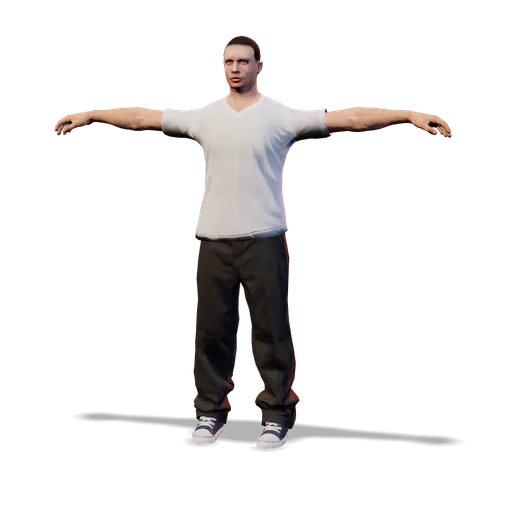
The auto-rig reads the shape of the model, so the pose decides how well it bends. Use a T-pose or an A-pose: upright, facing you, arms out to the sides, legs apart, feet flat, and one character with no base or stand. Arms held down stick to the body, a running pose gives bent legs, and arms held forward blend into the chest.
Free and Supporter limits
| Limit | Free | Supporter |
|---|---|---|
| Exports | 1 per day, resets at midnight UTC | Unlimited |
| Peds per project and per export | 5 | 50 |
| Largest texture side | 1024 px | 4096 px |
| Storage, shared with the other creator tools | 250 MB | 5 GB |
For everyone: 100 MB per uploaded file, and per ped up to 16 materials, 64 mesh parts, an 8 MB mesh and 32 MB of textures. Supporter costs $15 a month; see the Free and Supporter plans.
How to make a custom ped for FiveM, step by step
- Import your character
- Check the rig and the bone mapping
- Choose proportions and size
- Play GTA animations and clear the health checks
- Set the model name, materials and detail distance
- Export the ped pack
Import a character, watch it play GTA V animations and export a ready FiveM ped resource. One free export every day.
1. Import your character
Sign in with Discord, open the Ped Creator and drop your model and its textures on Drop your character or animal here. A project is created from the files, and its name becomes the resource folder name: "Server peds" exports as server-peds.
A rigged, standing humanoid imports straight away. Anything else opens the Human or animal? window: choose Human, read the pose check, then click Import (rigged file) or Auto-rig (unrigged). The auto-rig runs in your browser with a 12-second time limit. If the skin weights don't finish in time, it uses quicker weights and the Health panel says so. An unrigged mesh that is too heavy for one ped is simplified first.
2. Check the rig and the bone mapping
Every human ped ends up on GTA's 98-bone ped skeleton. Of those, 54 can take a bone from your model: the pelvis, three spine bones, the neck, the head and both eyes, plus on each side the clavicle, upper arm, forearm, hand, 15 finger bones, thigh, calf, foot and toe. The other 44 (the root, two extra spine bones, roll, IK and helper bones, and the face) keep their GTA place.
The Bones panel shows how many are mapped ("N of 54 GTA bones mapped"), and each row has a dropdown to pick the source bone by hand. You can't export until the pelvis, both thighs, calves and feet, and the head or the neck are mapped.
For an auto-rigged ped, the Rig card (marked Beta) has an Open Rig Editor button:
- Joints: drag any joint that sits wrong (Mirror left and right is on by default). Detect the joints again starts over, and Turn around, Tilt and Roll fix a model that loaded facing the wrong way.
- Fingers: Each finger gives every finger three bones, Mitten makes a thumb and one block for gloves, and Off moves each hand as one piece. A hand whose fingers weren't found stays rigid until you choose Standard fingers for it.
- Paint weights: paint what each bone moves with the Paint, Erase, Smooth, Fill and Select brushes.
3. Choose proportions and size
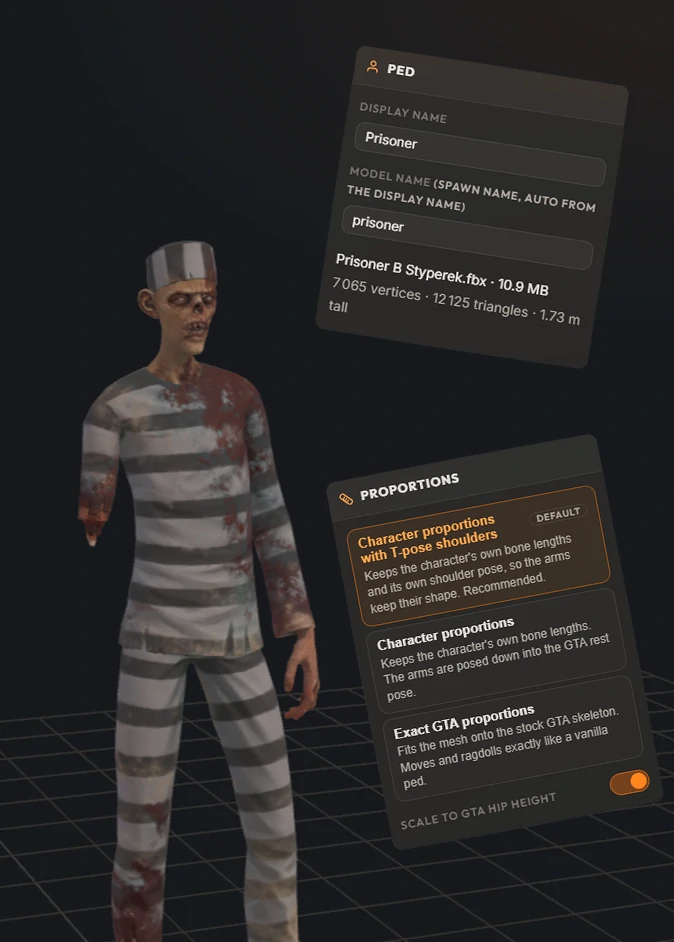
The Proportions panel decides how your character's shape meets the GTA skeleton:
| Mode | What it does | Pick it when |
|---|---|---|
| Character proportions with T-pose shoulders (default) | Keeps the character's own bone lengths and its own shoulder pose, so the arms keep their shape. | You are starting out. The editor recommends it. |
| Character proportions | Keeps the bone lengths, but poses the arms down into the GTA rest pose. | You want the arms bound the way a GTA ped's are. |
| Exact GTA proportions | Fits the mesh onto the stock GTA skeleton. | You want the ped to move and ragdoll exactly like a vanilla ped. |
Scale to GTA hip height (on by default) scales the ped so its hips sit at GTA height, 0.98 m; off keeps the model's own size. Auto-rigged humans that measure 1.2 to 2.2 m start with it off, because hip scaling can turn a short cartoon body into a giant.
Size (%), under Experimental features, scales the ped from 1 to 300% (locked in Exact GTA proportions). GTA animations are made for human-size peds: giants can lift off the ground when they run or crouch, and small peds move stiffly.
4. Play GTA animations and clear the health checks
The clip bar under the viewport plays 15 GTA V clips on your ped, from Idle, Walk and Sprint to Jump, Punch, Pistol aim, Crouch walk and Sitting, at 0.25× to 2× speed. Walk (addon default) is the walk your ped gets in game, from the move_m@business@c clip set in its peds.meta. Watch the shoulders, elbows, hips and feet, where a bad mapping shows first. Stock GTA ped next to yours puts a standard GTA male beside it for scale.
The Health panel ends in a badge: Ready, N notes or N to fix. It checks the skeleton, the skin weights and that the feet are on the ground, and lists unmapped bones, low-confidence joints and bones that had to be moved or twisted to fit. Errors block the export; notes don't, but read them.
5. Set the model name, materials and detail distance
Model name. The "Model name (spawn name, auto from the display name)" field takes 3 to 63 lowercase letters, digits or underscores, starting with a letter. The editor refuses base-game prefixes such as a_m_, s_m_, u_m_, ig_, mp_ and a_c_, and any name GTA V already uses: a clash replaces or collides with the game's model, and the game crashes when it loads either one. The GTA V ped list shows the stock names.
Materials. Each material gets a preset (Opaque uses GTA's ped shader, Transparent ped_alpha, Cutout ped_hair_cutout_alpha), a tint, diffuse, normal and specular slots, and Bumpiness, Specular and Glossiness sliders. A material without a diffuse texture exports as a flat color, and missing normal or specular maps are replaced with neutral ones.
Texture budget. Each ped's textures must fit one 32 MB texture dictionary. They are rounded down to a power of two, capped at your account's size and compressed with full mipmaps. One texture costs:
| Texture size | DXT1 (no transparency) | DXT5 (transparency) |
|---|---|---|
| 1024 × 1024 | 0.67 MB | 1.33 MB |
| 2048 × 2048 | 2.67 MB | 5.33 MB |
| 4096 × 4096 | 10.67 MB | 21.33 MB |
At 4096 px, one set of diffuse, normal and specular maps in DXT1 fills the whole 32 MB. When the textures don't fit, the export halves the biggest one until they do and tells you how many times it did.
Full detail up to (m). GTA stops drawing a ped's full model about 25 m away on foot, and sooner in a vehicle. The export has no lower-detail versions, so past that distance a human ped turns into GTA's generic low-detail stand-in (slod_human).
Raise the distance above 25 m (400 m at most) and the export adds lod.lua, a small client script that calls SetPedLodMultiplier on every ped of that model once a second, with the distance divided by 25 as the multiplier (100 m gives 4.00). It costs some performance, and graphics settings and vehicles still shift the switch. The option is new and not yet tested in game, so treat it as something to try, not a sure fix.
6. Export the ped pack
Click Export. The Export ped pack window lists each ped with its model name, mode and triangle count. Its Export button stays disabled while a row shows an error, such as unmapped bones or a mesh over 8 MB. Your browser converts and uploads each ped, then the server builds the files and the zip, named after your project (server-peds.zip).
Read the notices under the download link: they say when textures were halved, when neutral maps were used, or when the feet don't sit at the height GTA expects. The free daily export only counts when the zip is built, so a failed export doesn't use it up.
How to add custom peds to FiveM: install and spawn
- Unzip the download and copy the
server-pedsfolder into your server'sresourcesfolder. Keep the folder name. - Add
ensure server-pedstoserver.cfg. - Restart the server.
- Spawn the ped by its model name,
swat_guyin this example.
The export has no spawn command. A trainer or vMenu takes the model name directly (for vMenu, add it to the peds list in config/addons.json). To test from your own client script, this command turns you into the ped:
RegisterCommand('becomeped', function()
    local model = GetHashKey('swat_guy')
    if not IsModelInCdimage(model) then
        print('swat_guy is not streamed: check the folder name and the ensure line')
        return
    end
    RequestModel(model)
    while not HasModelLoaded(model) do Wait(0) end
    SetPlayerModel(PlayerId(), model)
    SetPedDefaultComponentVariation(PlayerPedId())
    SetModelAsNoLongerNeeded(model)
end)
To spawn it as an NPC instead, load the model the same way and call CreatePed with its hash.
These files use the PC Legacy formats (Gen8, RSC7) that classic FiveM servers run, in a stream folder. FiveM for GTA V Enhanced loads assets from stream_enhanced instead, and Cfx.re offers a converter called Alchemist. Compatibility of these exports with Enhanced servers has not been verified.
Troubleshooting custom peds
- The model doesn't load or spawn. Check that the console shows the resource starting, that the
ensureline matches the folder name, and that you used the model name (the<Name>inpeds.metaand the stream file names), not the display name. - The ped floats or sinks. GTA expects the soles at a fixed height, and the Feet on the ground check flags a mismatch. Remove any base or stand under the feet, and keep Scale to GTA hip height on.
- Arms, wrists or legs bend the wrong way. Read the bone-fit notes (such as "is twisted N deg from the GTA bone"), check the source bone in the Bones panel, try another proportion mode, or move the joints in the Rig Editor.
- The hands don't move. "N finger bones are not mapped and will not bend" means the source rig has no bones for them. Map them, or on an auto-rigged ped use Each finger or Standard fingers.
- Capes, long robes or long hair look stiff. They move stiffly on auto-rigged peds, and the export has no cloth simulation.
- The ped turns into a low-detail figure far away. That is GTA's stand-in past about 25 m; try a longer Full detail distance (step 5).
- The mesh is over 8 MB. Auto-rigged peds get a Simplify to fit button; for a rigged model, lower the polygon count in your 3D app.
Known limits
- The Ped Creator is in beta, and the auto-rig can be wrong. Check the joints and play a few clips before every export.
- No Medium or Low LOD models are made, only the full-detail mesh.
- Blend shapes and morph targets are dropped, so face shapes and expressions from your model don't carry over.
- No custom collision is generated.
- Each ped has one fixed look, with no clothing or texture variations to switch between in game.
Frequently asked questions
Do I need Blender to make a custom FiveM ped?
Not with the Ped Creator. Rigging, bone mapping and the animation preview happen in the browser, and the .yft, .ydd, .ytd and .ymt files, peds.meta and fxmanifest.lua are built for you. The classic route uses Blender with the Sollumz add-on or ZModeler3, plus OpenIV or CodeWalker.
What files does a FiveM add-on ped need?
Four files in the resource's stream folder, all named after the model: a .yft (skeleton), a .ydd (mesh), a .ytd (textures) and a .ymt (component setup). The peds.meta file stays outside stream, in the resource root, and fxmanifest.lua loads it with data_file 'PED_METADATA_FILE' 'peds.meta'.
How do I add a custom ped to my FiveM server?
Copy the resource folder into your server's resources folder, add ensure and the folder name to server.cfg, and restart. Then spawn it by model name with a trainer or vMenu, or from a script: RequestModel, wait for HasModelLoaded, then SetPlayerModel to become the ped or CreatePed to spawn it as an NPC.
Why does my custom ped look low-detail from far away?
Past about 25 m on foot, and sooner in a vehicle, GTA swaps a ped's full model for a lower-detail one. These add-on peds have no lower-detail models, so a human ped becomes GTA's shared slod_human stand-in. A Full detail up to (m) value above 25 adds a lod.lua script that pushes the switch further out with SetPedLodMultiplier. It is a new option that has not been tested in game yet.
Is the Ped Creator free?
Yes. You sign in with Discord, and a free account gets one Ped Creator export per day (it resets at midnight UTC), up to 5 peds per pack and textures up to 1024 px. Supporter costs $15 a month and removes the export limit, with up to 50 peds per pack and 4096 px textures.
Try the Ped Creator
Turn any humanoid or four-legged animal, rigged or not, into a streamed GTA V addon ped. Auto-rigged in your browser when it has no skeleton, packaged ready for your server. Free every day, unlimited for Supporters.
Open the Ped Creator