How to Make a Custom Animal Ped for FiveM
You will end up with an add-on dog, cat, deer or other four-legged animal that walks and runs with GTA V's animal animations, barks with a GTA sound set and works as a player model or an NPC.
A FiveM animal ped is an add-on ped built on one of GTA V's own animal skeletons, so the game moves it with that animal's animations and behavior. To make one, you fit a four-legged 3D model onto the closest of the 11 GTA animals and export it with that animal's peds.meta entry. This guide covers dogs, cats, deer and the other species, from the model to playing as it on your server.
You need a model of one four-legged animal, rigged or not, that you may use on your server, a Discord account for the Ped Creator (in beta), and access to your server's resources folder. For a human character, see how to make a custom FiveM ped instead.
How a FiveM animal ped works
GTA V has no single animal skeleton. The Rottweiler, the cat, the deer and the other animals each have their own skeleton, movement clips and entry in the game's peds.meta, and the clips are made for that skeleton. The practical way to add an animal is to build on the closest existing one: your model takes that animal's skeleton, clips and behavior, and only the look is new.
That is what the Ped Creator export does. The .yft is the vanilla animal's own file, ragdoll physics included, with your model's bone positions written in. The peds.meta entry is the vanilla animal's entry, copied whole: only <Name> changes, plus <AnimalAudioObject> if you pick another sound set. These fields come along with it:
| GTA animal | RelationshipGroup | DefaultUnarmedWeapon | AnimalAudioObject |
|---|---|---|---|
| Cat | CAT | WEAPON_CAT | ANIMAL_PARAMS_CAT |
| Dog (large) | GUARD_DOG | WEAPON_ANIMAL | ANIMAL_PARAMS_DOG_ROTTWEILER |
| Dog (small) | DOMESTIC_ANIMAL | WEAPON_SMALL_DOG | ANIMAL_PARAMS_SMALLDOG |
| Coyote / Wolf | WILD_ANIMAL | WEAPON_COYOTE | ANIMAL_PARAMS_COYOTE |
| Cougar / Big cat | COUGAR | WEAPON_COUGAR | ANIMAL_PARAMS_MOUNTAIN_LION |
| Deer | DEER | WEAPON_DEER | ANIMAL_PARAMS_ELK |
| Cow | DOMESTIC_ANIMAL | weapon_cow | animal_params_cow |
| Boar | WILD_ANIMAL | WEAPON_BOAR | ANIMAL_PARAMS_BOAR |
| Pig | DOMESTIC_ANIMAL | weapon_pig | animal_params_pig |
| Rabbit | WILD_ANIMAL | WEAPON_RABBIT | ANIMAL_PARAMS_RABBIT |
| Rat | WILD_ANIMAL | WEAPON_ANIMAL | animal_params_rat |
Pick the closest of the 11 GTA animals
Your ped moves exactly like the animal you pick, so choose the one whose build and gait are closest to your model:
| Choice | GTA model | Bones | Height | Good for |
|---|---|---|---|---|
| Cat | a_c_cat_01 | 58 | 0.4 m | House cats |
| Dog (large) | a_c_rottweiler | 82 | 0.9 m | Rottweiler, husky, shepherd, retriever |
| Dog (small) | a_c_pug | 60 | 0.5 m | Pug, terrier, chihuahua, poodle |
| Coyote / Wolf | a_c_coyote | 74 | 0.7 m | Coyote, wolf, fox |
| Cougar / Big cat | a_c_mtlion | 72 | 0.9 m | Cougar, panther, lion, tiger |
| Deer | a_c_deer | 75 | 1.7 m | Deer, elk, horses |
| Cow | a_c_cow | 80 | 1.5 m | Cow, bull, bison |
| Boar | a_c_boar | 72 | 1.2 m | Boar, warthog |
| Pig | a_c_pig | 74 | 0.7 m | Pig, hog |
| Rabbit | a_c_rabbit_01 | 47 | 0.5 m | Rabbit, hare |
| Rat | a_c_rat | 33 | 0.1 m | Rat, mouse |
- In the editor, every animal plays Idle, Walk, Run (canter) and Sprint (gallop). All but the cat, both dogs and the rabbit also have Trot.
- GTA V has no horse, so horses go on the Deer. There is no bird or fish skeleton to pick.
- The editor suggests an animal from the file name:
wolforfoxsuggests Coyote / Wolf,lionortigerCougar / Big cat,horseormooseDeer, and a plaindogDog (large). - The GTA model names are also the spawn names of the game's own animals. The GTA V ped list shows every
a_c_animal with a picture.
Pose and rig the model
The pose decides how well the animal moves. Joints are fitted to the GTA skeleton as they stand, so a head turned in the model stays turned in every clip. Before you import, check that the model stands on all four legs, with the head straight ahead in line with the back, the legs straight down with the feet on the ground, and the tail straight out behind.
Other poses fail too: in a lying or sitting model the legs can't be found, a mid-stride pose keeps the legs spread in every clip, and a curled tail sticks to the body. Re-pose the model in your 3D app first.
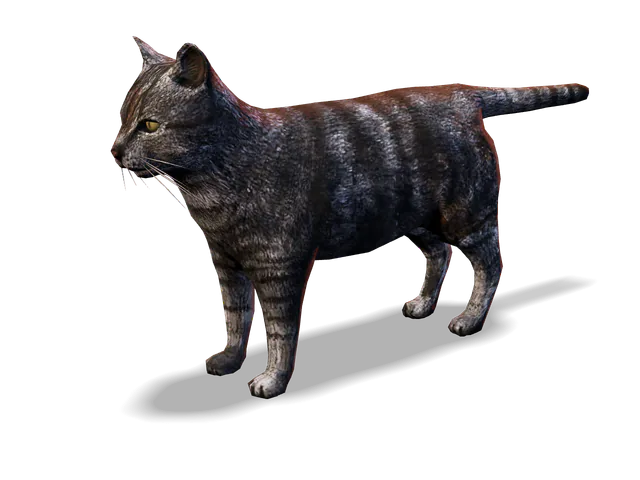
The model can be rigged or not:
- Unrigged models are auto-rigged in your browser on the skeleton of the animal you picked. The auto-rig places 22 joints: the head, neck base, chest, pelvis, tail base and tail tip, plus the shoulder, elbow, wrist, front foot, hip, knee, hock and hind foot on each side. It is in beta and can put joints in the wrong place, so check them in the Rig Editor.
- Rigged models keep their skin weights. The editor finds the legs, spine, neck and tail from the bone tree and the joint positions, so bone names matter little. A model on a GTA animal's own skeleton is recognized by its bone names and its animal is pre-selected, except that the boar and cougar share their bone names, as do the coyote and pig.
Mixamo's auto-rigger only handles humanoids, so the Mixamo route is for people, not animals.
Make a FiveM animal ped, step by step
- Import the model. Sign in with Discord, open the Ped Creator and drop the model (FBX, GLB, glTF, OBJ or STL) with its textures. In Human or animal?, choose Animal, then pick under Closest GTA animal. A Suggested badge marks the editor's guess from the skeleton or the file name, so check it:
k9_shepherd.fbxsuggests Dog (large), while an unriggedpolice_dog.fbxsuggests Human, because "police" counts as a human word. Read the pose check, then click Import (rigged) or Auto-rig (unrigged). - Check the joints and bones. For an auto-rigged animal, open the Rig Editor and drag any joint that sits wrong. The Bones panel groups the GTA bones into Spine and head, one group per leg, Tail and, for the rabbit, Ears. Leg rows use plain names such as Shoulder, Upper leg, Lower leg, Foot and Toe. The pelvis and head must be mapped before you can export. The GTA animal dropdown in the Ped panel switches to another animal at any time.
- Set the size. Scale to GTA hip height (on by default) sizes your animal so its hips sit as high as the GTA animal's: 0.59 m for Dog (large). Turn it off to keep your model's own size, or use Size (%) under Experimental features. GTA animal clips are made for the size of the GTA animal, and the further yours gets from it, the less well they fit.
- Play the clips and clear the Health panel. It checks that the skeleton matches the GTA animal, the feet are on the ground, the skin weights and mesh are valid, each joint fits its bone, and the skin follows mapped bones. Errors block the export.
- Pick the sounds. The Sounds dropdown in the Ped panel sets the GTA sound set the animal barks, growls and cries with. Each animal starts with its own, and the list has 20 sets, from Rottweiler and Husky to Cow, Rat and six birds.
- Name and export. Give the ped a model name and click Export.
Drop a four-legged model, pick the closest GTA animal and watch it walk and run before you export. One free export every day.
Make a K9 or custom dog ped
Police K9s and other big dogs go on Dog (large), which is GTA's Rottweiler. Small breeds go on Dog (small), the pug, and wolves and foxes on Coyote / Wolf.
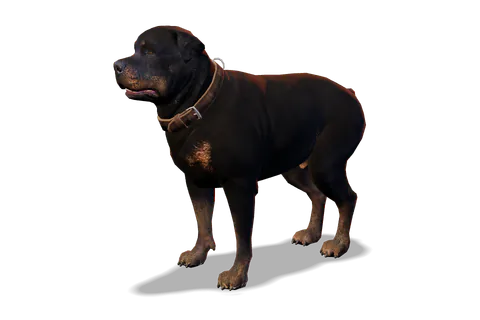
A large dog starts with the Rottweiler sounds. The Sounds list also has Shepherd, Retriever and Husky sets, but each lacks some Rottweiler calls, and the editor tells you how many stay silent:
| Sound set | Rottweiler calls left silent | Still has |
|---|---|---|
| Rottweiler (default) | None | All 20, including BARK, GROWL, HOWL and ATTACK |
| Shepherd | 5, including HOWL and panting | BARK, GROWL, SNARL, ATTACK |
| Retriever | 12, including ATTACK, GROWL and HOWL | BARK, SNARL, WHINE |
| Husky | 13, including ATTACK, SNARL, GROWL and HOWL | BARK, WHINE, PLAYFUL |
GTA's own shepherd is a_c_shepherd, but you can't overwrite it: the Ped Creator makes add-on peds only, and it refuses a_c_ names and any name GTA V already uses. Give your dog its own model name, such as k9_shepherd. If your K9 script lets you set the dog's model in its config, put that name there.
Install and play as your animal ped
Copy the exported folder into your server's resources folder, add ensure and the folder name to server.cfg, and restart. The export's README lists each animal with its skeleton and sound names. This client command turns you into the dog and follows the README's advice:
RegisterCommand('becomedog', function()
    local model = GetHashKey('k9_shepherd')
    if not IsModelInCdimage(model) then return end
    RequestModel(model)
    while not HasModelLoaded(model) do Wait(0) end
    -- an animal only has its own attack
    RemoveAllPedWeapons(PlayerPedId(), true)
    SetPlayerModel(PlayerId(), model)
    local ped = PlayerPedId()
    -- the README's fix for other players not seeing you
    SetPedComponentVariation(ped, 0, 0, 0, 0)
    SetPedComponentVariation(ped, 0, 0, 1, 0)
    SetPedDefaultComponentVariation(ped)
    SetModelAsNoLongerNeeded(model)
end)

RegisterCommand('bark', function()
    PlayAnimalVocalization(PlayerPedId(), 3, 'BARK')
end)
To spawn the animal as an NPC instead, load the model the same way and call CreatePed with its hash.
These files use the PC Legacy formats (Gen8, RSC7) that classic FiveM servers run. FiveM for GTA V Enhanced loads assets from stream_enhanced instead, and Cfx.re offers a converter called Alchemist. Compatibility of these exports with Enhanced servers has not been verified.
A free account gets one Ped Creator export per day (it resets at midnight UTC), up to 5 peds per pack and textures up to 1024 px. Supporter is $15 a month for unlimited exports, up to 50 peds per pack and 4096 px textures; compare the Free and Supporter plans.
Troubleshooting animal peds
- Other players can't see you as the animal. Use the README's fix, which the
becomedogcommand above already applies: set component 0 to texture 0 and then texture 1 withSetPedComponentVariation, then callSetPedDefaultComponentVariation. - The feet float above or sink below the ground. The Feet on the ground check in the Health panel compares your mesh with the GTA animal's ground level. Anything that hangs below the feet, such as a base or a stand, makes it fail. On an auto-rigged animal, also check the foot joints in the Rig Editor.
- A bark or other call doesn't play. Use a call name the animal's sound set has. The Rottweiler set has 20, from BARK and GROWL to HOWL and BARK_FAR, and the cat set has six, including CAT_MEOW and CAT_PURR. The README lists every call name per animal.
- The animal drowns. Land animals drown in deep water, as in the base game.
- The game crashes when the animal dies. Dying as an animal can crash game clients. This is a known GTA V issue in FiveM, not specific to these files.
Limits of custom animal peds
- Your animal moves exactly like the GTA animal under it: no new skeletons or animations.
- The Ped Creator and its auto-rig are in beta and can be wrong. Check the joints and play the clips before every export.
- Blend shapes are dropped, and no custom collision is generated.
- Clips fit best near the size of the GTA animal.
Frequently asked questions
Can you play as an animal in FiveM?
Yes. SetPlayerModel, or a trainer that changes your ped, works with GTA's own a_c_ animals and with add-on animal peds. Remove your weapons first with RemoveAllPedWeapons, because animals can only use their own attack, and keep out of deep water: land animals drown, as they do in the base game.
Why can't other players see my animal ped?
After SetPlayerModel, change a component texture once with SetPedComponentVariation(ped, 0, 0, 0, 0) and then SetPedComponentVariation(ped, 0, 0, 1, 0), and call SetPedDefaultComponentVariation(ped). This is the fix the Ped Creator export gives in its README.
Can I make a horse or bird ped for FiveM?
GTA V has no horse, so the Ped Creator suggests the Deer skeleton for horses, as it does for deer and elk. Birds and fish can't be made this way: all 11 GTA animals you can build on walk on four legs.
How do I make my dog ped bark in FiveM?
Call PlayAnimalVocalization(PlayerPedId(), 3, "BARK") from a client script. The names depend on the sound set: the Rottweiler set has BARK, GROWL, HOWL and 17 more, and the export's README lists the names for each animal in the pack.
Can I replace a_c_shepherd with my own dog?
Not with the Ped Creator, which only makes add-on peds and blocks a_c_ names and every model name GTA V already uses. Export the dog under a new name, such as k9_shepherd, and point your scripts at that name.
Try the Ped Creator
Turn any humanoid or four-legged animal, rigged or not, into a streamed GTA V addon ped. Auto-rigged in your browser when it has no skeleton, packaged ready for your server. Free every day, unlimited for Supporters.
Open the Ped Creator